For shops, sales teams and customer support

Every customer message, one inbox.

Zalo, Facebook, WhatsApp, Telegram, Email, Web Chat… all in one place. Reply fast with the AI assistant, close orders and send payment QR codes right inside the chat.

No card needed to start. iPhone and Android apps are available for your customer-care team.

ZaloFacebookWhatsAppTelegramViberEmailWeb Chat
Connect everything

From your customers' channels to your AI, through one place

Customers can message you anywhere and it all lands in one inbox. Your team replies with the help of AI and sales apps.

Connected channels

ZaloOA & personal
FacebookMessenger Page
WhatsAppOfficial & personal
Telegram
Viber
Email
Web ChatEmbedded in your website
ABC+
Support & sales team

One shared inbox with team-based permissions, on web, iPhone and Android

SieuTroly

AI & special apps

★ SieuTroly highlight

NotebookLM

Turn your notebook into the assistant's brain
  • Answers customers based on the documents in your notebook
  • Shows the sources so staff can check before sending
  • Use it to suggest replies or let the AI reply automatically
ChatGPT
Claude
Gemini
KiotViet
MISA
SePay · Casso

Chat channels (left) → your team (center) → AI, accounting, inventory and payments (right). Everything runs in the same chat window.

Why SieuTroly

Customers message everywhere, and your team can't open every app

Messages scattered across many apps make it easy to miss customers, reply late, and nobody knows how far each customer has been served.

📥

One shared inbox

Every channel feeds one conversation list, with unread counts and clear handling status.

⚡

Reply faster

The AI assistant reads your documents and suggests answers. Staff only review, edit and send.

🧾

Close orders on the spot

Create orders, send payment QR codes and issue invoices without switching to other software.

Features

Everything for a complete sales workflow

From the moment a customer messages to the invoice, it all happens in one place.

💬

Omnichannel inbox

Zalo (OA and personal accounts), Facebook, WhatsApp, Telegram, Viber, Email and Web Chat embedded in your website.

🤖

AI assistant

Connect ChatGPT, Claude or Gemini with your own key. Suggested replies from your internal documents; automatic replies from the Sales plan up.

🛒

Create orders

Search products even when typing without diacritics, add discounts and notes. AI can suggest an order from the conversation.

🏦

Payment QR & incoming money

Generate a VietQR code for each order. Connect SePay or Casso to see when money arrives, shown right in the inbox.

📄

MISA draft invoices

Look up tax IDs, pick goods, auto-calculate VAT and create draft invoices on MISA meInvoice (Professional plan).

🏪

KiotViet sync

Import your KiotViet product catalog to create orders fast, with no retyping (Sales plan and up).

👥

Customer management

Customer profiles combine contact channels, conversation history and notes. Search by name, phone number or email.

🔐

Team-based permissions

Each staff member sees and does only what they are granted. Workspace owners get a full-access Admin group from the start.

🔌

Webhooks & integrations

Add custom channels or automate through webhooks and n8n (Sales/Professional plans and up).

Automation

Build your own workflows, fitted to how your business works

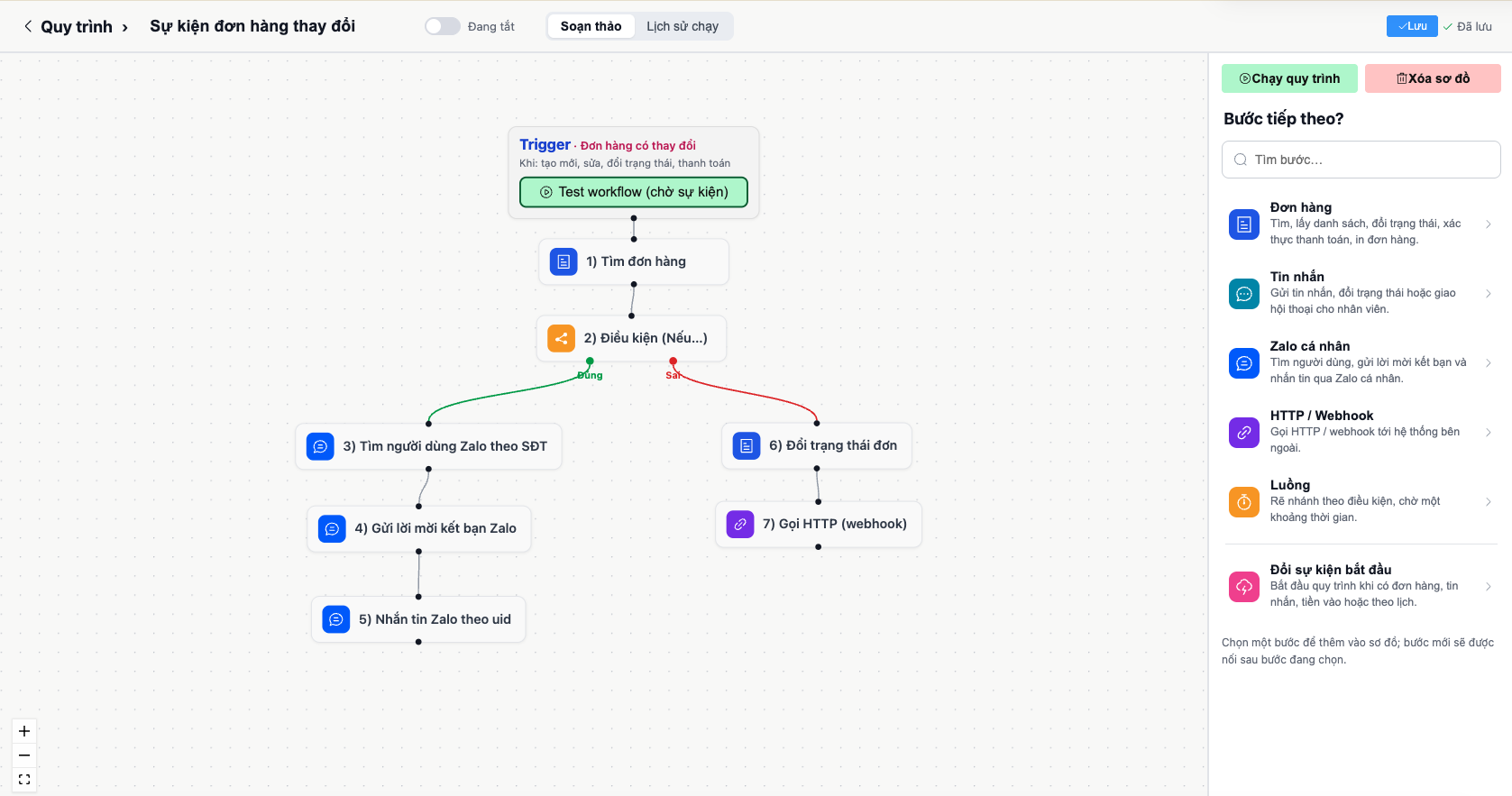
Every business sells and serves customers in its own way. Instead of following a fixed template, you design your own workflow: pick the starting event, add conditions, then connect the processing steps. Let the system handle the repetitive work so your team can focus on customers.

Workflow designer screen: order-changed event, find order, True/False condition branch, Zalo message, change order status and webhook call
Example: a workflow that runs when an order changes. If the condition is met it sends a Zalo friend request and message to the customer; otherwise it changes the order status and notifies another system.
🚀

Start from your own events

Run when an order is created, edited, changes status or is paid, when a new message arrives, when money comes in, or on a schedule.

🔀

Branch by your own rules

Set True/False conditions on order and customer data, and add a wait step. Each branch follows its own handling path.

🧩

Chain many tasks in one flow

Find orders, change status, message or friend-request on Zalo, assign the conversation to an agent, and call HTTP/webhooks to external systems.

For example: when an order is paid, automatically send the customer a confirmation; if it is still unpaid after 24 hours, remind the customer and notify the agent in charge. Change the rules any time, with no need to wait for development.

Get started

Three steps to get going

Create a workspace

Sign in with Google, Apple or email. Try it free for 14 days, no card needed.

Connect your channels

Scan a QR code or paste a key to connect Zalo, Facebook, Web Chat… We offer a setup package that helps connect channels and load documents for the assistant.

Reply and close orders

The whole team works from one inbox, on the web or the mobile apps (iPhone, Android).

Pricing

Choose a plan for your team size

Try the Sales plan free for 14 days. Pay yearly to get 2 months free and a free setup package.

Starter

Individuals, shops of 1–2 people

199,000₫ /month
  • 2 users
  • 3 official channels
  • 1 personal Zalo/WhatsApp account
  • 1 AI channel (suggested replies)
  • 5 knowledge documents
Get started

Sales

Sales teams of 3–5 people

399,000₫ /month
  • 5 users
  • 8 official channels
  • 3 personal Zalo/WhatsApp accounts
  • 3 AI channels, auto-reply & order creation
  • KiotViet sync, “money received” messages
  • Webhooks, custom permission groups
Try free for 14 days

Professional

Companies of 6–15 people

990,000₫ /month
  • 15 users
  • 20 official channels
  • 8 personal Zalo/WhatsApp accounts
  • 10 AI channels, 500 documents
  • MISA draft invoices
  • Custom channels, n8n, unlimited history retention
Get started

Enterprise

Chains and organizations that need dedicated infrastructure

from 5,000,000₫ /month
  • Users and channels as needed
  • Custom integrations
  • SLA, dedicated server
  • Data processing agreement
Contact us

Prices exclude 10% VAT and exclude AI costs paid directly to the provider (OpenAI, Anthropic, Google) through your own API key. Setup package 1,500,000₫: connecting channels, importing products, loading documents for the assistant and a trial run (free when paying yearly). Prices may change; see current prices in the app.

FAQ

Frequently asked questions

Do I need a card to try it?

No. You try the Sales plan free for 14 days; when it ends, choose a plan and pay by QR bank transfer.

How does payment work?

The system creates a QR code for each order. When the money arrives, the plan is activated automatically through the SePay or Casso link. You can choose 1, 3, 6 or 12 months (12 months is charged as 10).

How does the AI assistant use my data?

The assistant uses your own API key (ChatGPT, Claude or Gemini) and the documents you load. AI costs are billed by the provider directly to your account.

Can I use a personal Zalo account?

Yes, you connect the account by scanning a QR code. The maximum number of accounts depends on the plan, and you can buy more by the month.

Data and privacy?

Each staff member only sees what they are granted access to. Users can delete their account right in the mobile app. Details in the privacy policy.

Is there an Android app?

Yes. The Android version is currently released as an APK file for trial: download the Android app (requires Android 8.0 or later, manual install, see the guide in the Apps section). A Google Play version will come later. You can also use the web version or the iPhone app on the App Store.

Do I need advice or help connecting channels?

Email [email protected] and we will reply and guide you through connecting channels and loading documents for the assistant.

Download the apps

Use SieuTroly on every device

Phone, computer or browser — your messages and orders always stay in sync.

For your device

iPhone

Available on the App Store, with automatic updates.

iOS 17 or later

Download on the App Store
Installation guide
  1. Open the App Store on your iPhone and install “Siêu trợ lý”.
  2. Sign in with Apple, Google or email.
  3. Allow notifications to receive new messages right away.
For your device

Android

Install directly from the APK file; a Google Play version will come later.

Version 1.1.2 · 2.8 MB · Android 8.0 or later

Download APK
Installation guide
  1. Open this page on your Android phone and tap the download button.
  2. Open the downloaded file. If asked, tap Install → turn on Allow from this source, then go back and tap Install.
  3. Sign in with the email or Google account you use on the web.

SHA-256: 093f8731a2d077e182d2784e24d6a33c2d2015edd52f813e1dce944e96226896

For your device

Mac

Signed and notarized by Apple, with push notifications.

Version 1.1.4 · 32.2 MB · macOS 14 or later (Intel and Apple silicon)

Download .dmg
Installation guide
  1. Open the .dmg file and drag SieuTroly into the Applications folder.
  2. The first time you open it, macOS may ask for confirmation: click Open.
  3. Sign in with Google or email (Sign in with Apple is not yet supported on Mac).

SHA-256: a923edec40d1a628f80db30d942b1c58743eca4a5204791441ab4b98229549c5

For your device

Windows

Its own window, minimizes to the system tray and alerts you to new messages.

Version 1.1.4 · 82.0 MB · Windows 10 or later (64-bit)

Download .exe installer
Installation guide
  1. Open the downloaded .exe file and follow the installation steps.
  2. If Windows shows a SmartScreen warning (this build is not code-signed yet): click More info → Run anyway.
  3. Sign in with Google or email. When you close the window the app keeps running in the system tray to alert you to new messages; choose Quit in the tray to close it completely.

SHA-256: 808f6dd032abf59e841ccea06c18b8e69a59c30afeaf1c220557441057b1558b

  • Notifications for new messages; tap one to open that exact conversation
  • Reply with text and images, change conversation status
  • AI assistant, order creation and payment QR codes right in the chat window
  • Internal team chat: groups, reactions, mentions, reminders
  • Customers, orders and unread messages stay in sync across devices
  • Sign in with Google or email; delete your account right in the app

Don't want to install anything? Use it right in your browser at app.sieutroly.ai.

Ready to bring every message into one place?

Create a workspace in minutes and try every Sales plan feature free for 14 days.

Start free trial

Need advice? Email [email protected]